



Core CRMCore CRM
CUSTOMER RELATIONSHIPS, IN CONTEXT

Every customer has a story.
Keep your team in the picture.

Core CRM keeps customer details, requests and the latest conversation together. Your team can pick up the follow-up knowing what has already been discussed.

01

Know the customer

Customer details and interests stay clear to the team.

02

Pick up where you left off

The latest conversation summary stays with the customer record, so follow-up can continue with context.

03

Know the next step

Follow-up status and contact permission help the team see what to do next.

Today in Core CRM

See the follow-ups due today, then open a customer record.
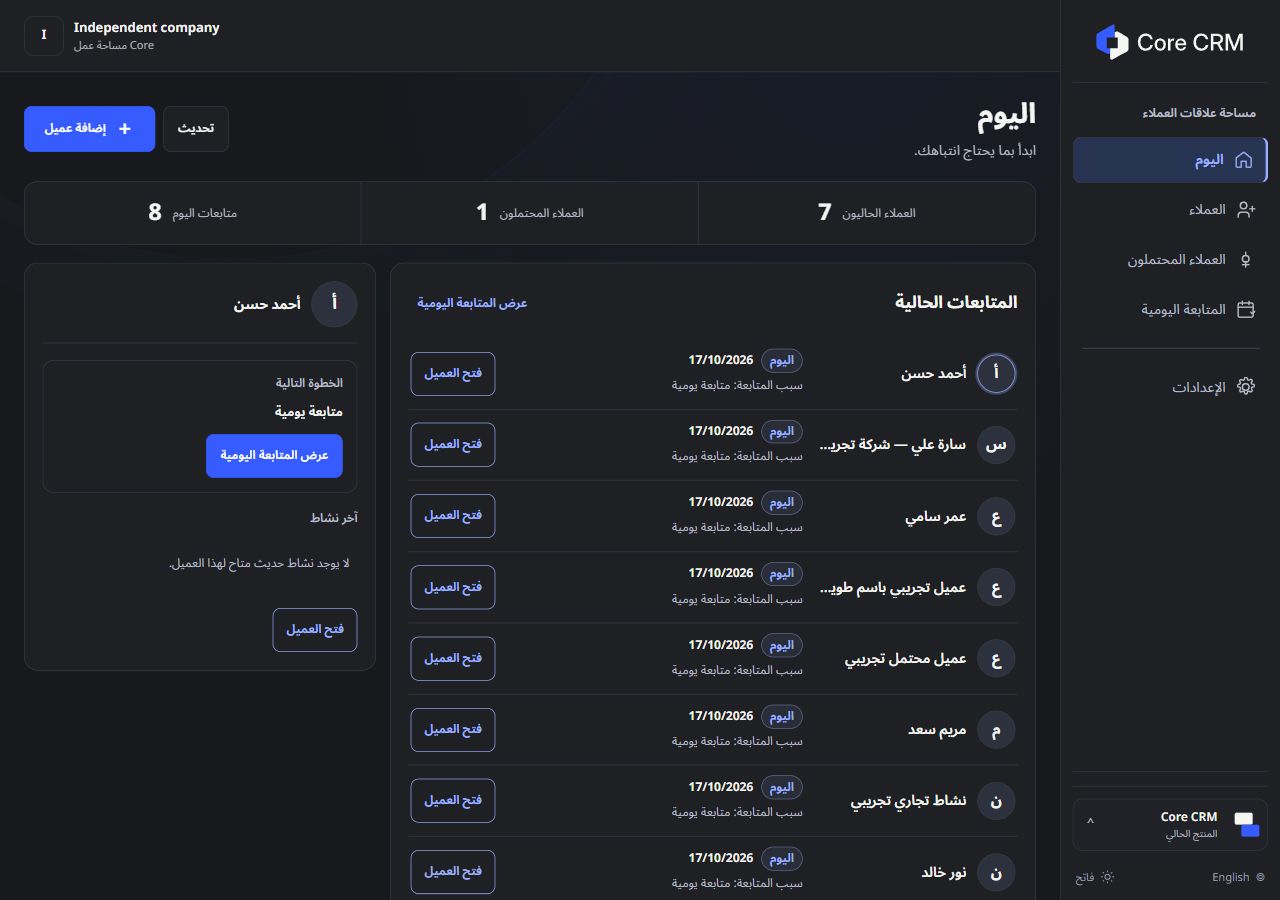
Core CRM Arabic daily follow-up interface with synthetic customer records
Implemented product interface · Synthetic sample data. Shown names and numbers are illustrative.

See the idea at work.

An interactive product illustration, not live data or a connected service.

Core CRMINTERACTIVE CONCEPT
The relationship, in context

Illustrative record · no real customer data

New inquiry
In review
Follow-up
EXAMPLE / 001Service inquiryConversation summary available
Context stays with the request
ConversationClear summary
Contact permissionNeeds confirmation
OwnershipFollow-up team
Inquiry received
Context added to the record
Next step defined
Illustrative experience, not a live system. Product scope, interface and integrations are defined for each project.
00:00 / 00:30
Madar-1 and Core CRM

Ask about the customer.
Update the record.

Connect Core CRM to Madar-1 to ask about a customer, recap the last conversation, or add and edit record details. We agree what it can do within your team’s permissions.

Explore Madar-1


Madar-1Madar-1
Example requests
“Summarize my latest conversation with this customer.”
“Update the customer details with the new information.”
Illustrative examples · not a live integration
EXPLORE CORE PRODUCTS
Madar-1Co-Work
LET’S START HERE

Let’s put your customer follow-up in order.

Request a demo